
JST ERP New Feature Updates in November 2026 | 09.11.2026
Efficient operations depend not only on speed but also on having accurate information at the right stage of every workflow.
JST ERP function update for November 2026 focuses on several everyday processes across order management, warehouse operations, customer service, document printing, and after sales management.
Businesses with multiple branches can now include branch information directly during order imports. Warehouse teams can search multiple locations and product codes at once during stock counting, while customer service teams can better distinguish Shopee automated messages from conversations that require a response.
Printing templates and return processes have also been improved to provide clearer tax information, better document organization, and more accurate after sales records. Here is a closer look at what has changed and how each improvement supports daily operations.
1. Order excel import now supports branch office information
Menu: Order Management › Order › Import Order
The order import template now includes a Branch Office field. Users can specify the branch associated with each order directly within the import file before uploading the data into JST ERP.
This means branch information can be assigned during the import process instead of being added to individual orders afterward. For imported orders using this field, the relevant invoice information must support the branch office format.

2. Stock count now supports batch searches for multiple warehouse locations and product codes
Menu: Warehouse › Stock Count › Add Location
Stock Count search conditions now support entering multiple warehouse locations and multiple product codes at the same time. Instead of searching for each warehouse location or product individually, users can enter several items and perform a batch query.

3. Shopee automated messages are separated without changing conversations to read status
Menu: Chat
JST ERP can now recognize automated messages sent by the Shopee platform. When an automated Shopee message is received, the system will no longer change the conversation status to read based only on that automated message.
Shopee conversations may contain both platform generated messages and real messages from buyers that require customer service attention. If an automated message causes a conversation to appear as already read, customer service teams may incorrectly assume that the conversation has already been handled.
The new logic helps keep unread status focused on customer messages that still require attention, reducing the risk of missing an actual buyer enquiry.
4. Return Order Templates Now Support Tax Calculation Method Information
Menu: Setting › Printing Templates › Return Order Templates
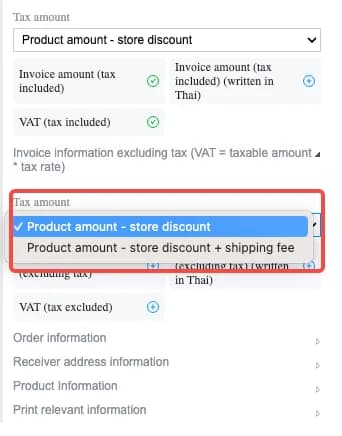
JST ERP has also optimized the logic used to retrieve the amount of information so that the tax amount and total amount displayed on return documents are more accurate.
The updated template supports both tax inclusive and tax exclusive scenarios. Return transactions may involve different tax structures depending on the original order or document. Displaying the tax calculation method directly on the return document provides clearer information when reviewing returned amounts.
The improved amount logic also supports more accurate reconciliation when businesses handle both taxable and non taxable return scenarios.
5. Other Inbound and Outbound Order Templates and Express Receipt Templates Now Support Page Numbers
Menu: Setting › Printing Templates
Printing Templates now support inserting page numbers into Other Inbound and Outbound Order documents and Express Receipt documents. When a document contains multiple pages, the template can display the current page together with the total number of pages.
Multi-page warehouse and shipping documents can easily become mixed up when they are printed, separated, or passed between different teams. Page numbers make the document sequence immediately visible and help staff confirm whether every page is present.
This is especially useful for documents containing large numbers of products or records that require several printed pages.
6. Return Scan Registration Now Restricts Orders That Have Not Been Shipped Through the System
Menu: Return › Return Scan Registration
During Return Scan Registration, JST ERP now checks whether the related order has already been shipped through the system. If the order has not yet been shipped through JST ERP, the system will prevent the return registration from being saved and display a notification to the user.
After sales activities should normally follow the actual order process.
Allowing a return record to be created for an order that has not yet reached the shipping stage can result in after sales information that does not match the real order status. The new validation helps ensure that Return Scan Registration is only performed for eligible shipped orders, keeping after sales records aligned with the actual order lifecycle.

If you're looking for a system to help manage orders, inventory, and warehouse management in one place, JST ERP is designed to support growing online businesses.
Interested in learning more? Get a free consultation with our team.
Leave your information in the form below and our team will contact you shortly.
👉🏻 Click here 👈🏻
JST ERP Together, Empowers You